
KYC and documents
Work through missing requirements, evidence verification, and review deadlines.
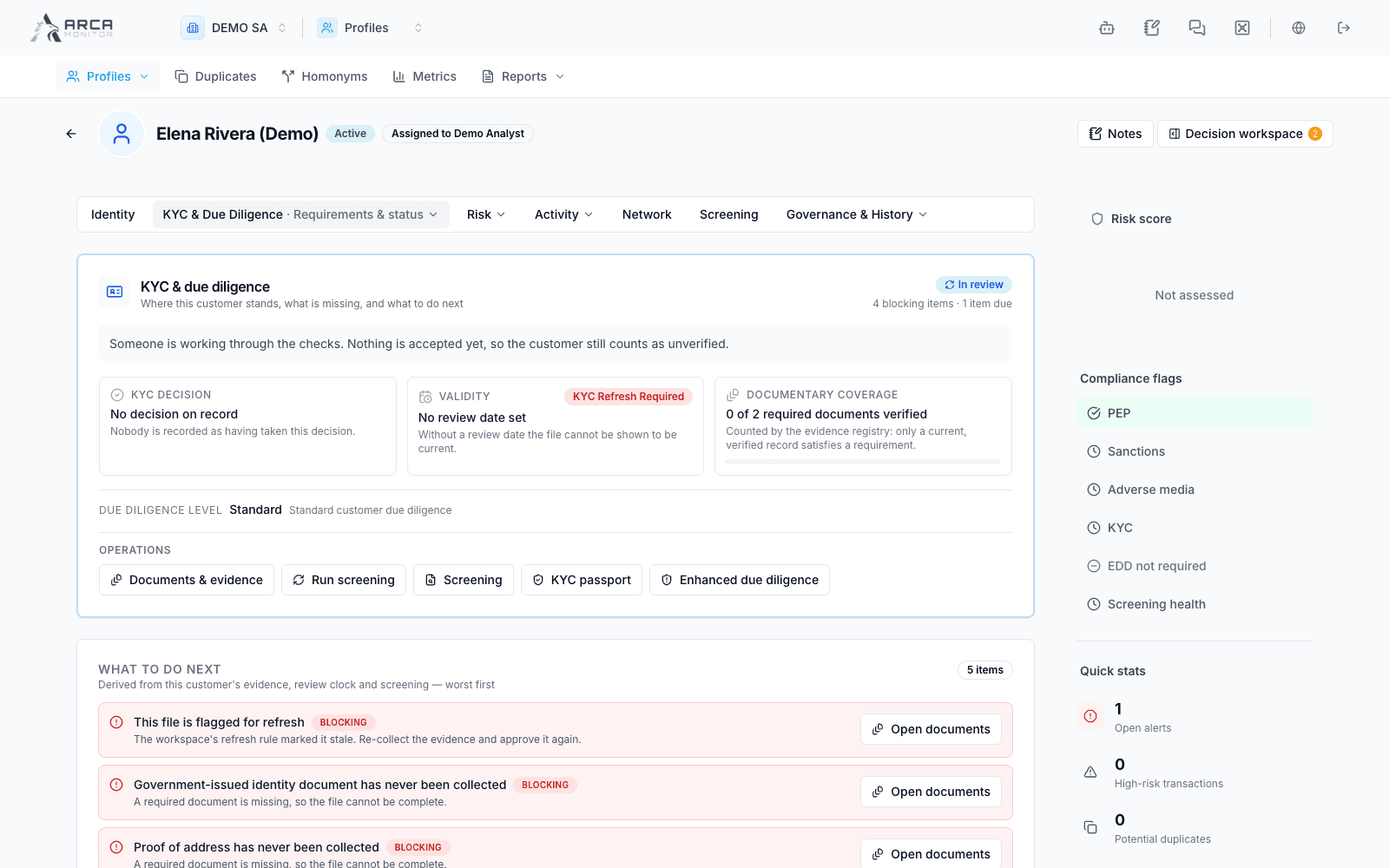
Open KYC & Due Diligence → Requirements & status in the profile. Begin with the current KYC state, review date, effective requirements, and the work items that explain what needs attention.
Read the work before the percentage
The work queue distinguishes blocking issues, work due now, and advisory context. It can direct you to missing or expired evidence, verification proposals, screening, or enhanced due diligence. Read each consequence and use the action attached to that item.
An item received or pending verification is not yet verified evidence. A completed-looking checklist does not override a rejected, suspended, or expired KYC state. Review both the lifecycle and the effective evidence requirements for the entity.
Add or replace supporting evidence
- Open Documents & evidence within KYC.
- Locate the applicable requirement or evidence category and use its available upload or registration action.
- Select the correct document type and provide the requested metadata and dates. Confirm the intended subject and document before uploading.
- Inspect the resulting evidence entry, its source, lifecycle, and any reconciliation findings.
- Follow the available verification workflow. Upload success records receipt; it does not by itself verify the content or approve KYC.
Document controls vary by evidence source and permissions. Follow the offered replacement or retirement controls rather than assuming all evidence can be edited or deleted in place.
Verify or reject evidence
Open the relevant item’s decision action. Inspect the underlying document, enter the requested rationale, and submit the verification or rejection. The platform can apply the decision or submit it for independent approval according to its capabilities and policy.
If approval is required, an eligible reviewer examines the proposal and approves or declines it with the requested explanation. Check the updated evidence lifecycle and outstanding work afterward. A pending proposal must not be counted as verified evidence.
Screening, EDD, and passport
Follow a screening work item to Screening, where matches and coverage are reviewed. A screening shortcut starts assessment only when permitted; wait for its result.
If enhanced due diligence is required, inspect the relevant section and existing case context before starting additional work. A section that has not loaded does not prove there is no active EDD case.
The KYC passport view holds the profile’s passport context. Requesting a passport, issuing one, and approving KYC are separate outcomes. Follow the status actually returned.
Finish the review
Recheck the review deadline, unresolved requirements, pending decisions, and evidence that expires soon. Hand off the profile reference and specific outstanding item. If a control is disabled, read its reason and request the appropriate reviewer rather than treating the item as complete.
Screens and controls
KYC requirements and status
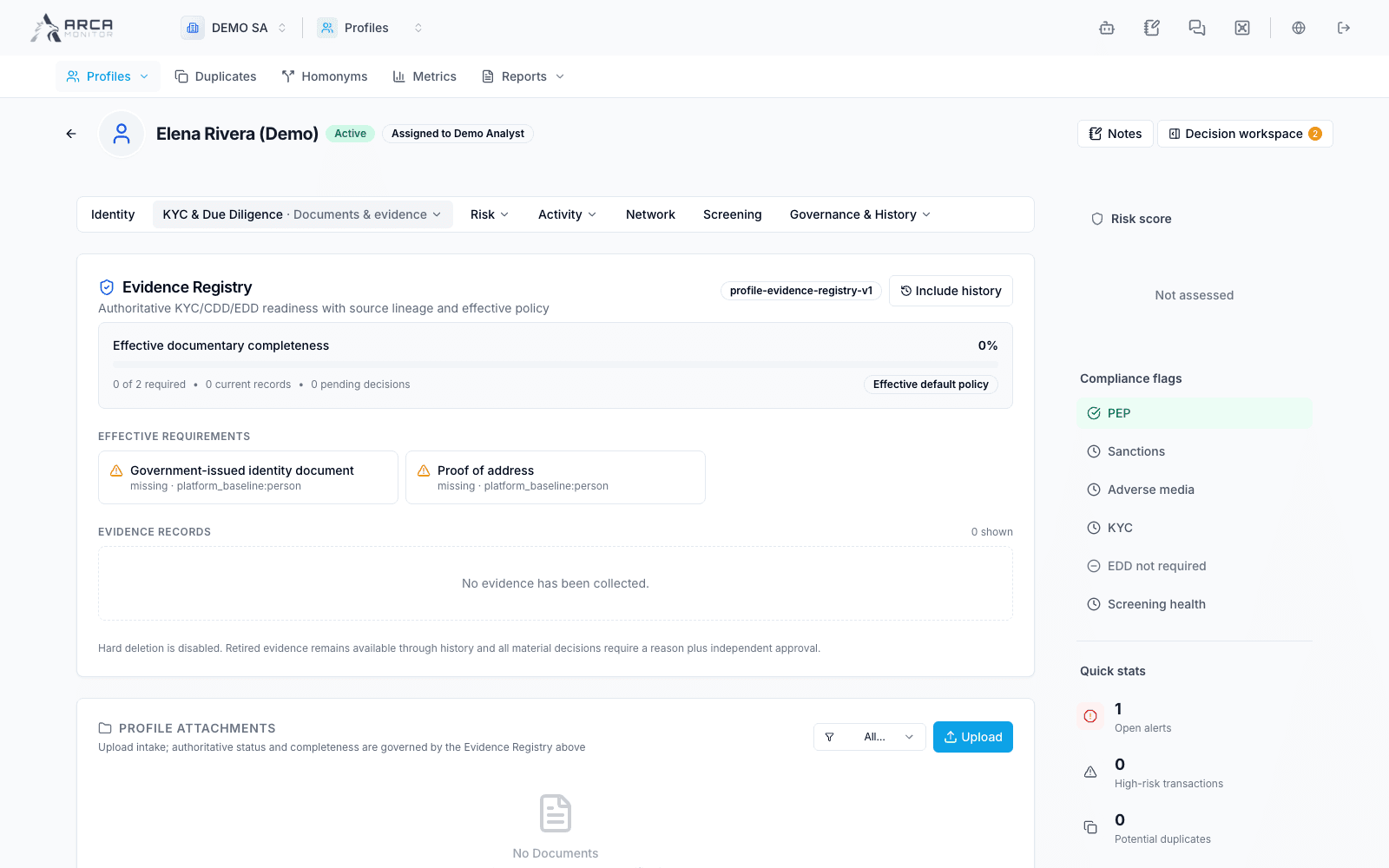
Evidence Registry shows missing required support
KYC passport and its current readiness
The DEMO SA example shows 0 of 2 required in the Evidence Registry while a legacy Data Quality card further down shows 100%. Use the effective requirements and evidence status to identify outstanding work; the legacy percentage does not verify missing documents.