
Review a match
Compare the selected record, understand the decision scope, and follow the required second signature.
Open a row from Hits and confirm the subject, workspace, and source. The review page groups records into Sanctions lists, PEP, Adverse media, and Own lists. Pending counts help locate outstanding work. When a source contains several records, select the record you intend to review.
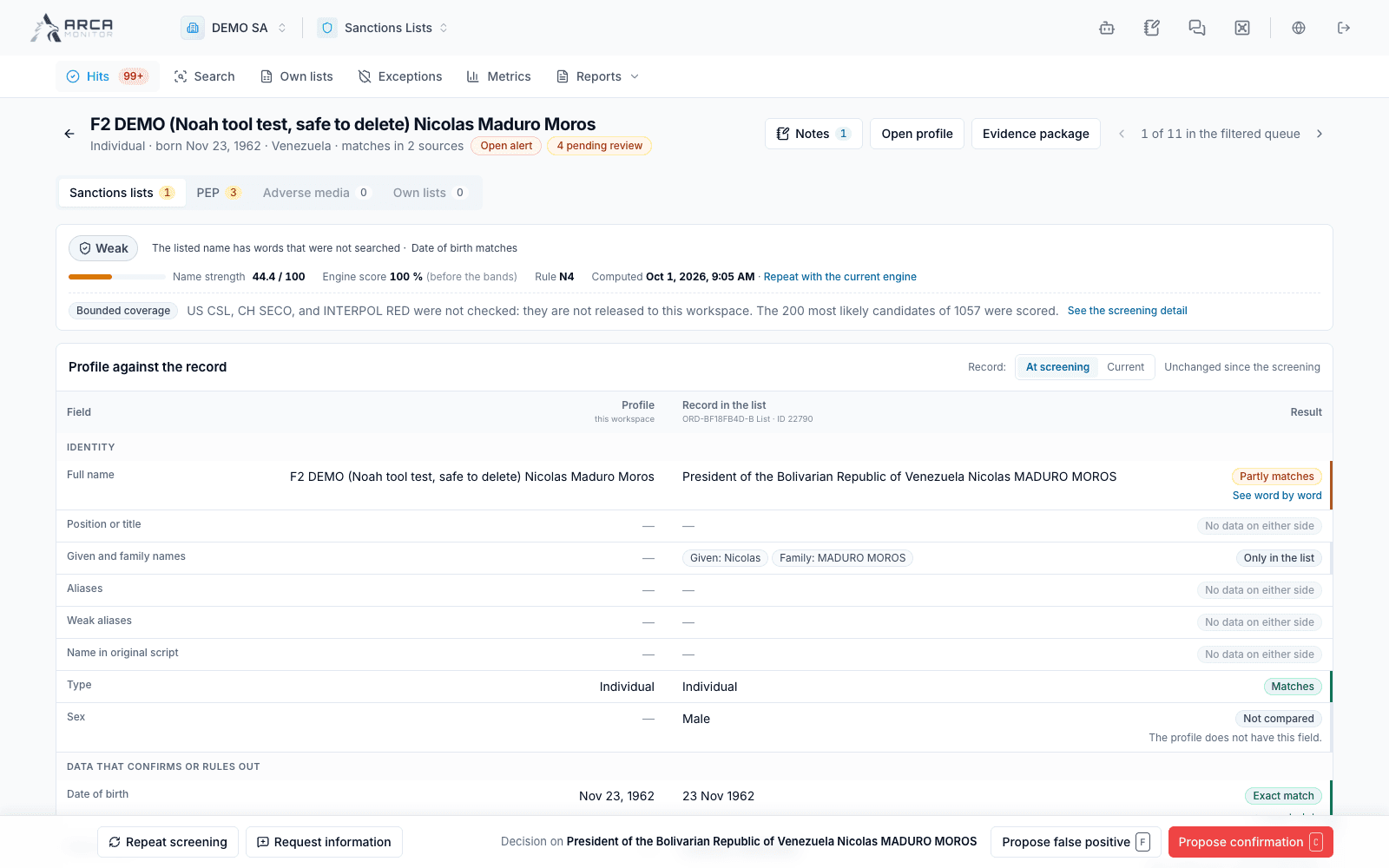
Compare the evidence
- Read the explanation of why the match appeared and the coverage information.
- Compare names and aliases, birth information, countries, identifiers, and the source-specific information in the comparison table.
- Distinguish an actual disagreement from a field that was absent or not compared. Missing information does not establish that two identities differ.
- For sanctions evidence, inspect the captured snapshot and the current record when those versions are offered. The snapshot describes what the earlier check used; current source data may have changed.
- For PEP, review role, jurisdiction, dates, relationships, and the source. For media, inspect the article, publisher, date, and relevance to this subject.
A strength band or similarity score supports prioritization. It does not establish identity by itself. Read bounded or missing-coverage notices before relying on an apparently quiet source.
Choose the appropriate decision
| Source | Decisions shown in the detailed review |
|---|---|
| Sanctions | Confirm match; False positive. |
| PEP | Confirm PEP; Not the person. |
| Adverse media | Not the person; The person, no risk; The person: relevant. |
| Request-level review | The dialog explicitly says when the decision covers the whole screening. |
Own-list and request-backed evidence may be reviewed at request scope. Read the scope notice; do not assume that every selected card has its own independent disposition.
If a decision is refused because the subject is unlinked, use the offered profile-linking flow after checking identity, then reopen the review. A visible decision button does not override that requirement.
Enter a rationale that describes the evidence and remaining uncertainty. If the dialog requests a second signature, submit the proposal and follow it through an eligible independent reviewer. The proposer cannot supply their own second signature. A rejection returns the work for further review; verify the actual current state afterward.
Ask for missing information
Use Request information to choose workspace members or an available MTO and specify the evidence needed. Review the selected recipients, attachments, and whether a TAG channel will be used before sending. Channel requests create collaborative work; the non-channel route has its own due-date and notice behavior. This action can notify other people.
Read the request in history and use the offered response or cancellation action when appropriate. Recording an answer resumes review; it does not itself decide the match. Use Notes for the review record and confirm saving before leaving.
Re-screening is a new assessment, not an undo of the previous decision. Inspect its result and follow any exception or list effect reported by the platform. A screening decision is separate from transaction payment confirmation.