Monitoring and freshness
Check that recurring assessments actually ran and that their source data is current.
Use Metrics to inspect monitoring health and data freshness. Configure recurring work in Governance → Configuration → Screening. An enabled schedule, a fresh list, and a currently assessed profile are three different facts.
Read monitoring health
Inspect the last run, progress, outcomes, delays, failures, and any hold or pause explanation. Distinguish change-driven re-screening from scheduled configurations. A healthy source update does not prove that the affected profiles were already reassessed.
Follow the configuration or run reference to its history. Review how many subjects were selected, screened, skipped, failed, or left incomplete according to the available counters. A queued run is a request for work, not its successful completion.
Configure a scheduled population
- Open the monitoring section in Governance and choose the available create/edit action.
- Give the configuration a clear name and select the intended screening policy.
- Define the population, such as profile type, risk levels, and score range, and choose the sources and applicable alert thresholds.
- Review the schedule and its timezone. Schedule definitions are stored in UTC; read the displayed conversion rather than assuming browser-local execution time.
- Save and verify whether the configuration is active, disabled, paused, or unscheduled, along with its next-run information.
- If you use Run now, follow the resulting run through history. Closing the page is not a cancellation.
Check freshness and versions
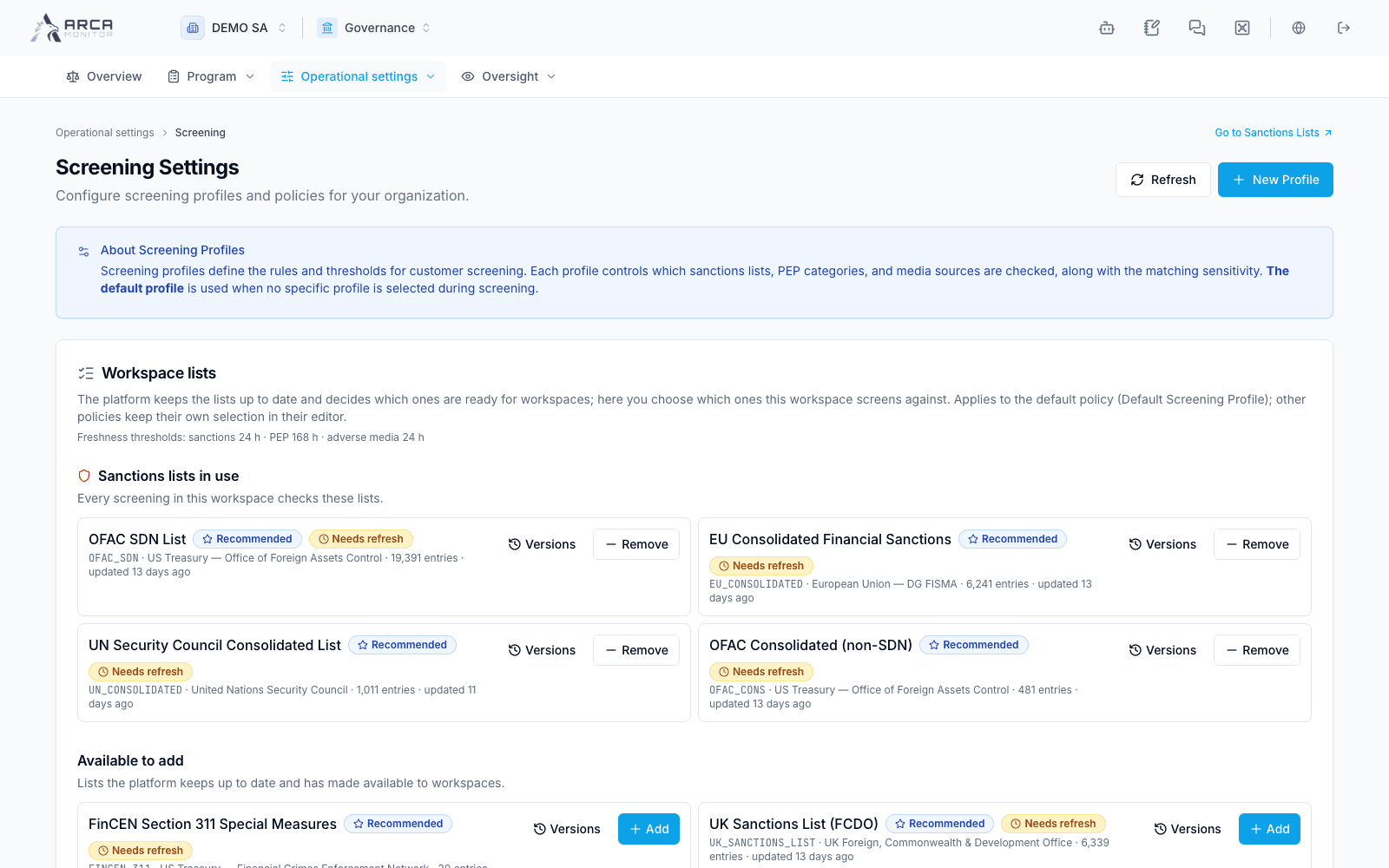
The freshness section describes the workspace’s available sanctions, PEP, media, and own-list information. Read the source, last update, current status, and configured freshness criteria. Never updated, unavailable, or stale data is not interchangeable with a successful assessment containing zero matches.
Open the relevant source/list version history where offered. Use Governance’s workspace-list area to inspect released/selected lists and their versions. A policy can name a source that is not available to the workspace; the recorded check must still be read for that coverage gap.
If monitoring appears stalled
Refresh the view, inspect its recorded explanation, and verify the configuration’s scope and policy. An empty or impossible population can explain a run without subjects. Avoid creating overlapping configurations to compensate for an unexplained delay; provide the run reference to the responsible administrator. Evaluate the actual result before relying on the profile’s screening state.
Screens and controls
Selected sources and their freshness